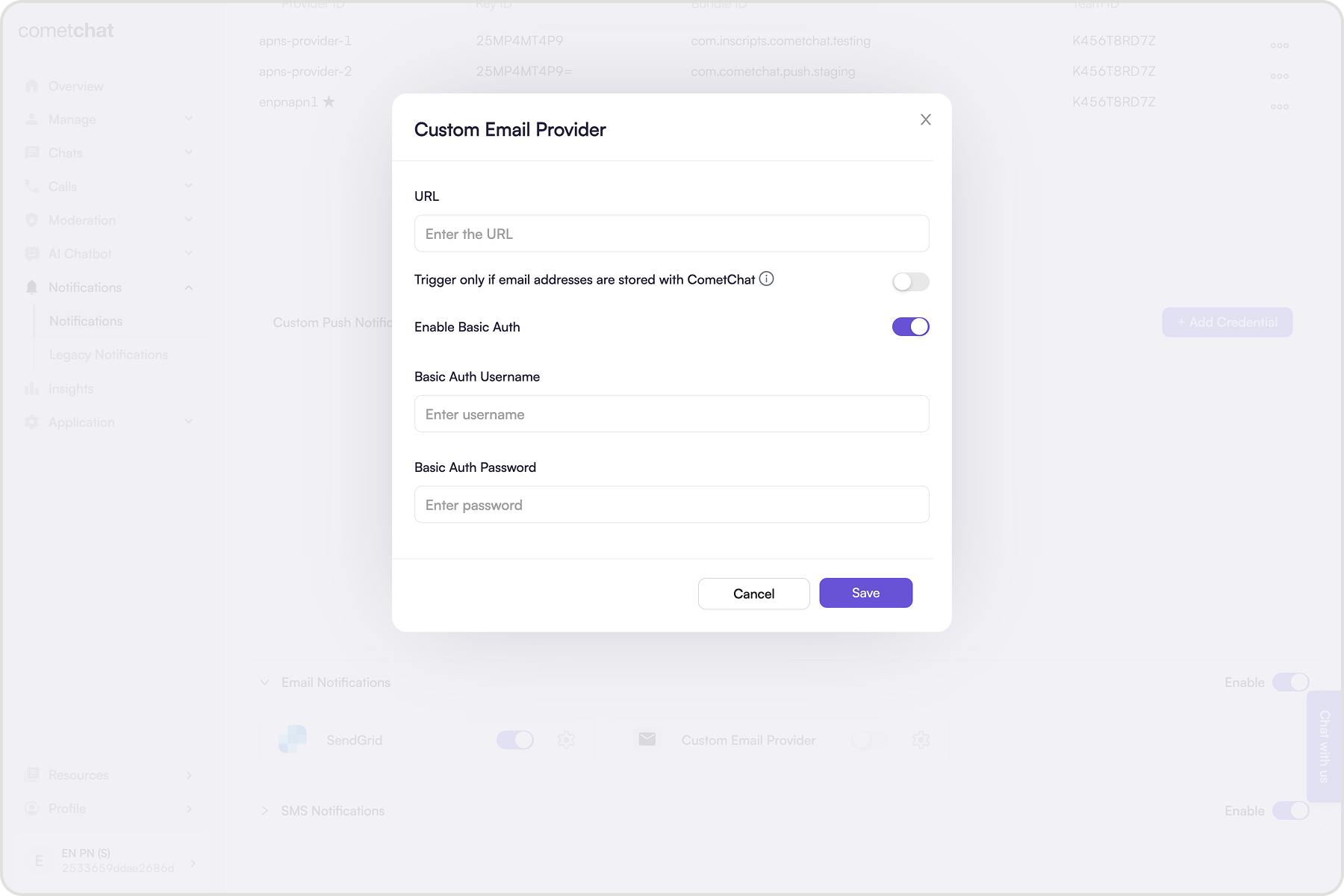
Use a custom provider to send CometChat email notifications through any gateway via webhook. SendGrid is built-in; choose custom when you want another service or your own SMTP bridge.

Prerequisites

  1. Public https:// webhook that accepts POST JSON.
  2. Return 200 OK within ~2 seconds (do heavy work async).
  3. Secure the endpoint (recommended): Basic Auth or a verified signature. With Basic Auth, the request includes:
Authorization: Basic <Base64-encoded-credentials>

Add credentials

  1. Click on the ”+ Add Credentials” button.
  2. Enable the provider.
  3. Enter the publicly accessible webhook URL.
  4. (Recommended) Enable Basic Authentication and set username/password.
  5. Decide if you want to Trigger only if email address is stored with CometChat (via Update Contact details API); when off, the webhook fires regardless.
  6. Save the credentials.

How delivery works

For one-on-one events, CometChat calls your webhook once per recipient. For group events, it calls once per member—one HTTP request per user to notify. Example: if a group has 100 members, your webhook receives 100 POSTs.
{
  "trigger": "email-notification-payload-generated",
  "data": {
    "to": {
      "uid": "cometchat-uid-1",
      "email": "andrew-joseph@example.com", // Optional
      "name": "Andrew Joseph"
    },
    "messages": [
      {
        "sender": {
          "uid": "cometchat-uid-4",
          "avatar": "https://assets.cometchat.io/sampleapp/v2/users/cometchat-uid-4.webp",
          "name": "Susan Marie"
        },
        "message": "Are we meeting on this weekend?",
        "messageObject": {CometChat Message Object}, // Present if "Include message object" is enabled. The message object is present for new messages or in case a message was edited
      },
      {
        "sender": {
          "uid": "cometchat-uid-4",
          "avatar": "https://assets.cometchat.io/sampleapp/v2/users/cometchat-uid-4.webp",
          "name": "Susan Marie"
        },
        "message": "📷 Has shared an image",
        "messageObject": {CometChat Message Object}, // Present if "Include message object" is enabled. The message object is present for new messages or in case a message was edited
      }
    ],
    "senderDetails": {
      "uid": "cometchat-uid-4",
      "name": "Susan Marie",
      "avatar": "https://assets.cometchat.io/sampleapp/v2/users/cometchat-uid-4.webp"
    },
    "subject": "New messages from Susan Marie"
  },
  "appId": "app123",
  "region": "us/eu/in",
  "webhook": "custom"
}

Sample server-side code

const express = require('express');
const app = express();
const PORT = process.env.PORT || 3000;

app.use(express.json());

// Optional: Basic authentication middleware
const basicAuth = (req, res, next) => {
  const authHeader = req.headers['authorization'];
  if (!authHeader || !authHeader.startsWith('Basic ')) {
    return res.status(401).json({ message: 'Unauthorized' });
  }
  next();
};

const triggerEmailNotification = async (to, data) => {
  let { name, uid, email } = to;
  let { groupDetails, senderDetails, subject } = data;

  if (groupDetails) {
    console.log('Received webhook for group email notification');
  }

  if (senderDetails) {
    console.log('Received webhook for one-on-one email notification');
  }

  if (email == null) {
    // Your implementation to fetch Email ID
    email = await fetchEmailIDFor(uid);
  }

  // Your implementation for sending the email notification
  await sendEmail(email, subject, data.messages);
};

app.post('/webhook', basicAuth, (req, res) => {
  const { trigger, data, appId, region, webhook } = req.body || {};
  const { to } = data || {};

  if (
    trigger !== 'email-notification-payload-generated' ||
    webhook !== 'custom'
  ) {
    return res.status(400).json({ message: 'Invalid trigger or webhook type' });
  }

  console.log('Received Webhook:', JSON.stringify(req.body, null, 2));

  triggerEmailNotification(to, data)
    .then((result) => {
      console.log(
        'Successfully triggered email notification for',
        appId,
        to.uid,
        result
      );
    })
    .catch((error) => {
      console.error(
        'Something went wrong while triggering email notification for',
        appId,
        to.uid,
        error.message
      );
    });

  res.status(200).json({ message: 'Webhook received successfully' });
});

app.listen(PORT, () => {
  console.log(`Server is running on port ${PORT}`);
});