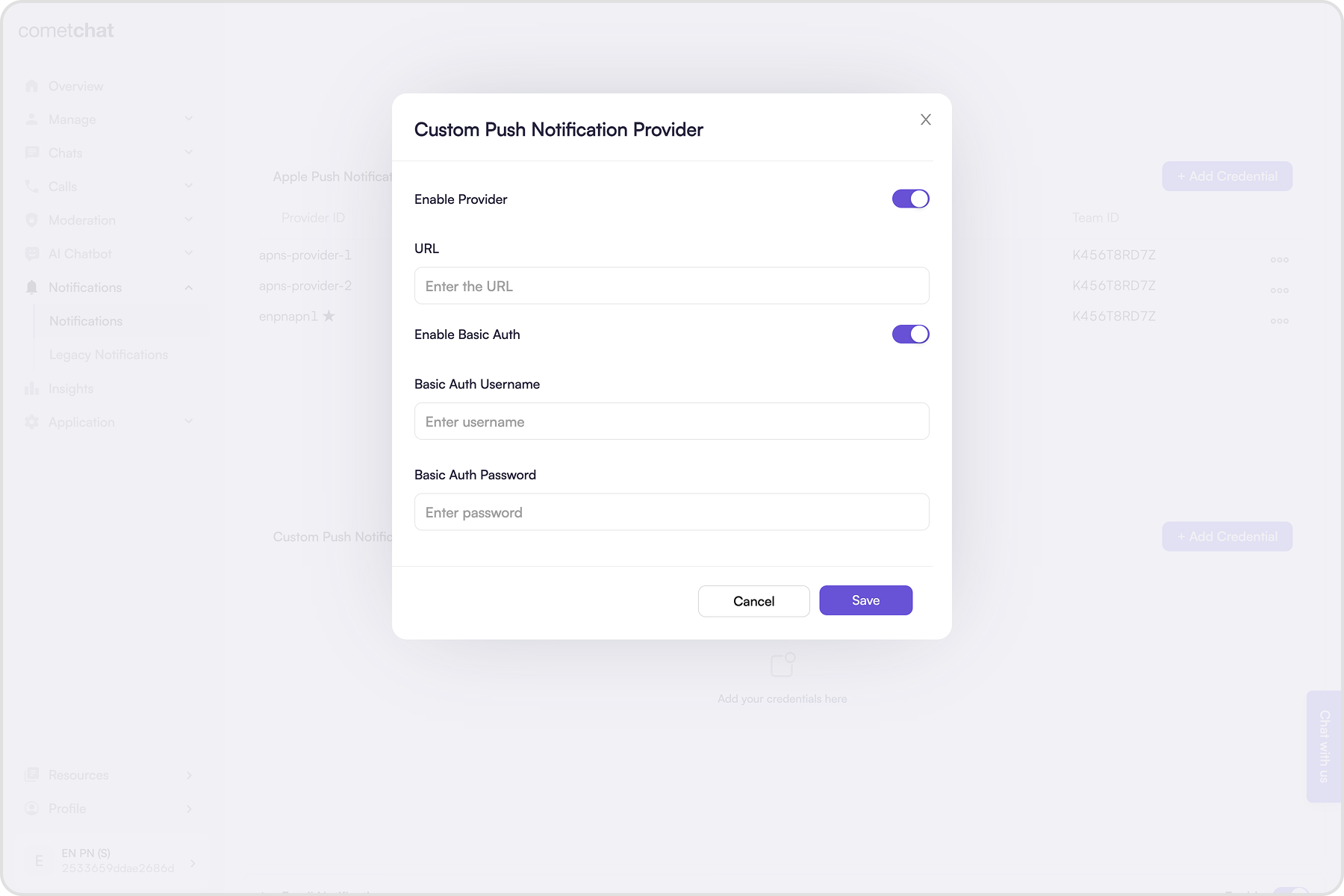
Custom providers let you route push payloads to your own webhook instead of FCM/APNs. Use this page to set up credentials, understand payload shapes, and wire a simple receiver. When to use a custom provider
  • You already have a push gateway (or a third-party) and want CometChat to hand off payloads.
  • You want to enrich or filter notification payloads before delivery.
  • You need to fan out to multiple channels from one webhook.
How delivery works
  • CometChat POSTs one payload per recipient: once for one-on-one, once per member in a group.
  • Your webhook must return 200 OK within ~2 seconds; you handle the actual push delivery.
  • Keep payloads small; respect any rate limits on your infrastructure.

Add custom provider credentials

Custom providers use a webhook URL that receives everything needed to trigger push notifications through your own system.

Prerequisites

  1. An https:// webhook that is publicly reachable and accepts POST JSON.
  2. Respond with 200 OK within 2 seconds; do any heavy work asynchronously.
  3. Secure the endpoint (recommended): Basic Auth or a verified signature. With Basic Auth, send Authorization: Basic <Base64-encoded-credentials>.
  4. Your client should register push tokens with your backend on login and unregister on logout.
  5. For multi-device, map push tokens to the user’s auth tokens so each session can be targeted.

Add credentials

  1. Click on the ”+ Add Credentials” button.
  2. Enable the provider.
  3. Enter the publicly accessible webhook URL.
  4. (Recommended) Enable Basic Authentication.
  5. Enter the username and password.
  6. Save the credentials.

How does it work?

For one-on-one events, the custom provider fires once per recipient. For group events, it fires once per member so you receive one HTTP request per user who should be notified. Example: if a group has 100 members, your webhook receives 100 POSTs—one for each member.

Payload reference

Every request includes trigger: "push-notification-payload-generated" and webhook: "custom". The notification content lives in data.notificationDetails; use that to decide how you deliver the push. Below are sample payloads for different events:
{
  "trigger": "push-notification-payload-generated",
  "data": {
    "to": {
      "uid": "cometchat-uid-2"
    },
    "notificationDetails": {
      // Notification details
      "title": "Andrew Joseph", // The title of the notification to be displayed
      "body": "Hello!", // The body of the notification to be displayed
  
      // Sender's details
      "sender": "cometchat-uid-1", // UID of the user who sent the message.
      "senderName": "Andrew Joseph", // Name of the user who sent the message.
      "senderAvatar": "https://assets.cometchat.io/sampleapp/v2/users/cometchat-uid-1.webp", // Avatar URL of the user.
  
      // Receiver's details
      "receiver": "cometchat-uid-2", // UID or GUID of the receiver.
      "receiverName": "George Alan", // Name of the user or group.
      "receiverAvatar": "https://assets.cometchat.io/sampleapp/v2/users/cometchat-uid-2.webp", // Avatar URL of the receiver.
      "receiverType": "user", // Values can be "user" or "group"
  
      // Message details
      "tag": "123", // The ID of the message that can be used as the ID of the notification to be displayed.
      "conversationId": "cometchat-uid-1_user_cometchat-uid-2", // The ID of the conversation that the message belongs to.
      "type": "chat",
      "sentAt": "1741847453000",
      "message": {CometChat Message Object}, // Present if "Include message object" is enabled. The message object is present for new messages or in case a message was edited or deleted.
      "custom": {Custom JSON} // Custom JSON object is added in case it is configured in the preferences.
    }
  },
  "appId": "app123",
  "region": "us/eu/in",
  "webhook": "custom"
}

Sample server-side code

Example Express webhook that checks Basic Auth, validates the trigger, and forwards the payload to your push gateway.
const express = require('express');
const app = express();
const PORT = process.env.PORT || 3000;

app.use(express.json());

// Optional: Basic authentication middleware
const basicAuth = (req, res, next) => {
  const expected =
    'Basic ' +
    Buffer.from(
      `${process.env.WEBHOOK_USER}:${process.env.WEBHOOK_PASS}`
    ).toString('base64');

  if (expected && req.headers.authorization !== expected) {
    return res.status(401).json({ message: 'Unauthorized' });
  }
  next();
};

// Look up the push token for the recipient in your store.
const fetchPushToken = async (uid) => {
  // TODO: Implement fetch logic.
  return 'device-push-token';
};

// Send to APNs/FCM/other provider with the payload you received.
const sendPushNotification = async (token, title, body, notificationDetails) => {
  // TODO: Implement delivery.
};

const triggerPushNotification = async (to, notificationDetails) => {
  const { uid } = to || {};
  const { type, title, body, callAction, sessionId, callType } =
    notificationDetails || {};

  if (!uid) {
    throw new Error('Missing recipient UID');
  }

  if (type === 'call') {
    console.log('Push notification for calling event', {
      callAction,
      sessionId,
      callType,
    });
  }

  if (type === 'chat') {
    console.log('Push notification for messaging event');
  }

  const token = await fetchPushToken(uid);
  await sendPushNotification(token, title, body, notificationDetails);
};

app.post('/webhook', basicAuth, (req, res) => {
  const { trigger, data, appId, webhook } = req.body || {};
  const { to, notificationDetails } = data || {};

  if (
    trigger !== 'push-notification-payload-generated' ||
    webhook !== 'custom' ||
    !to ||
    !notificationDetails
  ) {
    return res.status(400).json({ message: 'Invalid trigger or webhook type' });
  }

  console.log('Received webhook', { appId, trigger, webhook, to: to.uid });

  triggerPushNotification(to, notificationDetails).catch((error) => {
    console.error(
      'Error while triggering push notification for',
      appId,
      to.uid,
      error.message
    );
  });

  res.status(200).json({ message: 'Webhook received successfully' });
});

app.listen(PORT, () => {
  console.log(`Server is running on port ${PORT}`);
});